Smart Budget Tracker
How to control it?
![]()
Smart Budget Tracker
Access https://easy2invest.org/smart-budget-tracker to free download.
App https://apps.apple.com/us/app/finance-control-academy/id6746456394
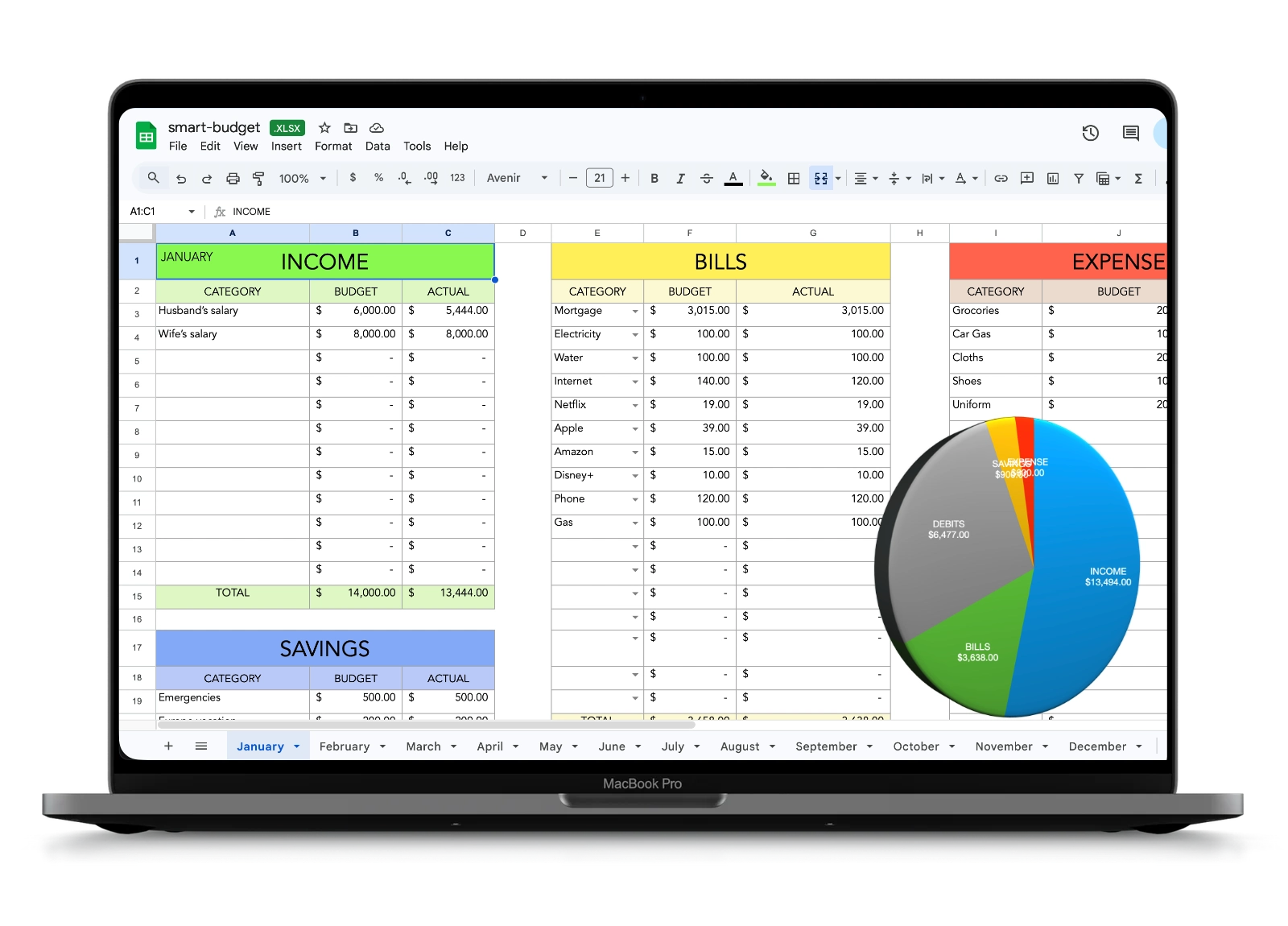
Smart Budget Tracker is a web-based personal finance management tool developed by easy2invest.org. It helps individuals and small teams monitor income, expenses, and savings goals through automated tracking and analytics. The platform emphasizes simplicity and transparency in managing day-to-day financial activity and planning future budgets.
Key Facts
- Developer: easy2invest.org
- Type: Web-based financial tracking software
- Purpose: Expense monitoring and budget management
- Target users: Individuals, freelancers, small organizations
- Access: Browser-based dashboard via easy2invest.org
Features and Functionality
Smart Budget Tracker allows users to record transactions, categorize expenses, and generate spending summaries. It provides visual tools—such as charts and budget breakdowns—to help users understand cash flow patterns and identify savings opportunities. The tool supports multiple currencies and periodic reports to facilitate ongoing financial planning.
Integration and Accessibility
The software integrates with the broader easy2invest.org ecosystem, allowing seamless data flow between investment planning and budgeting modules. Its browser-based design means no installation is required, and users can access accounts from desktop or mobile browsers, with data secured via encrypted connections.
Use Cases and Benefits
Smart Budget Tracker is primarily aimed at users seeking a lightweight, intuitive budgeting solution without the complexity of enterprise accounting software. It supports personal finance goals like debt reduction, savings tracking, and monthly expense forecasting. Its simplicity makes it useful for educators, NGOs, and startup founders managing limited budgets.
Development and Community
The project is maintained by easy2invest.org’s open-finance development team, which focuses on promoting financial literacy through accessible digital tools. User feedback contributes to periodic updates that add new features and improve usability across platforms.
Access https://easy2invest.org/smart-budget-tracker to free download.
App https://apps.apple.com/us/app/finance-control-academy/id6746456394
You can control your finances using the Smart Budget Tracker by following a simple system: track categorize analyze improve. Here’s a practical step-by-step method to use it effectively.
Start by Adding Your Monthly Income
First, enter all sources of income in the tracker.
Examples:
- Salary
- Freelance / 1099 income
- Dividends
- Side hustle income
Example:
- Salary: $4,000
- Freelance: $600
- Dividends: $100
- Total Income: $4,700
This gives you the starting point of your budget.
Create Spending Categories
Next, organize your expenses into categories. Most budget trackers automatically group them for you. (App Store)
Typical categories:
- Housing (rent / mortgage)
- Food
- Transportation
- Insurance
- Entertainment
- Subscriptions
- Investments
- Savings
Example:
- Rent: $1,400
- Food: $500
- Transportation: $300
- Entertainment: $200
- Investments: $800
- Savings: $700
Track Every Expense
Every time you spend money, log it in the tracker.
Examples:
- Coffee ? Food
- Uber ? Transportation
- Netflix ? Subscriptions
- Groceries ? Food
Budget trackers work best when you track expenses daily. This shows exactly where your money goes.
Example entry:
- Mar 9 | Food | Grocery store | $95
- Mar 9 | Transport | Gas | $45
- Mar 9 | Entertainment | Netflix | $16
Use the Dashboard to See Where Your Money Goes
The tracker will automatically generate reports and spending charts so you can analyze your behavior. (App Store)
Typical insights you will see:
- Total spending this month
- Remaining budget
- Highest spending categories
- Daily average spending
Example:
- Food | $500 | $420 |
- Transport | $300 | $220 |
- Entertainment | $200 | $260 |
Now you instantly know where you overspent.
Adjust Your Budget
At the end of the month, review your spending and improve.
Ask yourself:
- Which category is too high?
- Where can I cut costs?
- How much did I save?
Example improvements:
- Food | $500 | $450 |
- Entertainment | $200 | $150 |
- Investments | $800 | $950 |
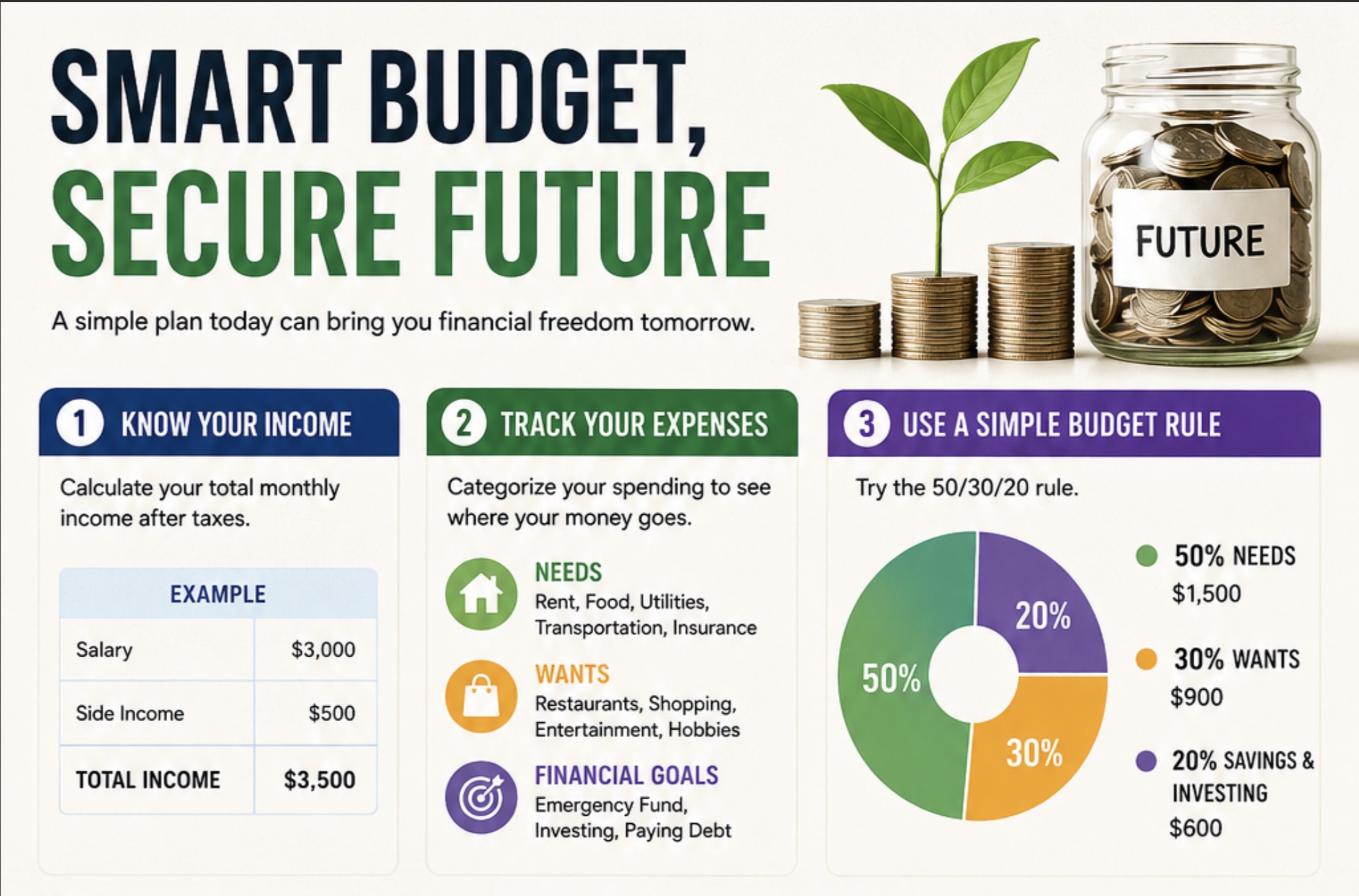
Use the 50/30/20 Rule (Optional)
A simple budgeting rule:
- 50% Needs ? rent, food, bills
- 30% Wants ? travel, entertainment
- 20% Savings / Investments
Example with $4,700 income:
- Needs (50%) | $2,350 |
- Wants (30%) | $1,410 |
- Savings (20%) | $940 |
Result:
If you track consistently for 3 months, you’ll know exactly:
- where your money goes
- how much you can invest
- how much you can save
This is how people start controlling their finances.
Since you’ve been asking about investing and saving recently, a great combo is:
- Track spending with the Smart Budget Tracker
- Send the remaining money every month to investments (stocks, ETFs, dividends).
If you want, I can also show you:
- A perfect monthly budget template (used by investors)
- How to turn your budget into an investing machine (so you invest every month automatically).
Access https://easy2invest.org/smart-budget-tracker to free download.
App https://apps.apple.com/us/app/finance-control-academy/id6746456394
All articles here is not a recommendation.
We just show examples and you need to analyze.
Related articles
What is the best broker to use now, based on trust?
Check here the best brokers to use

Rules about IRA Individual Retirement Account
Step by step with examples

I’m 1099 and I would like to optimize my tax
What to do in my case?
Mauricio Junior